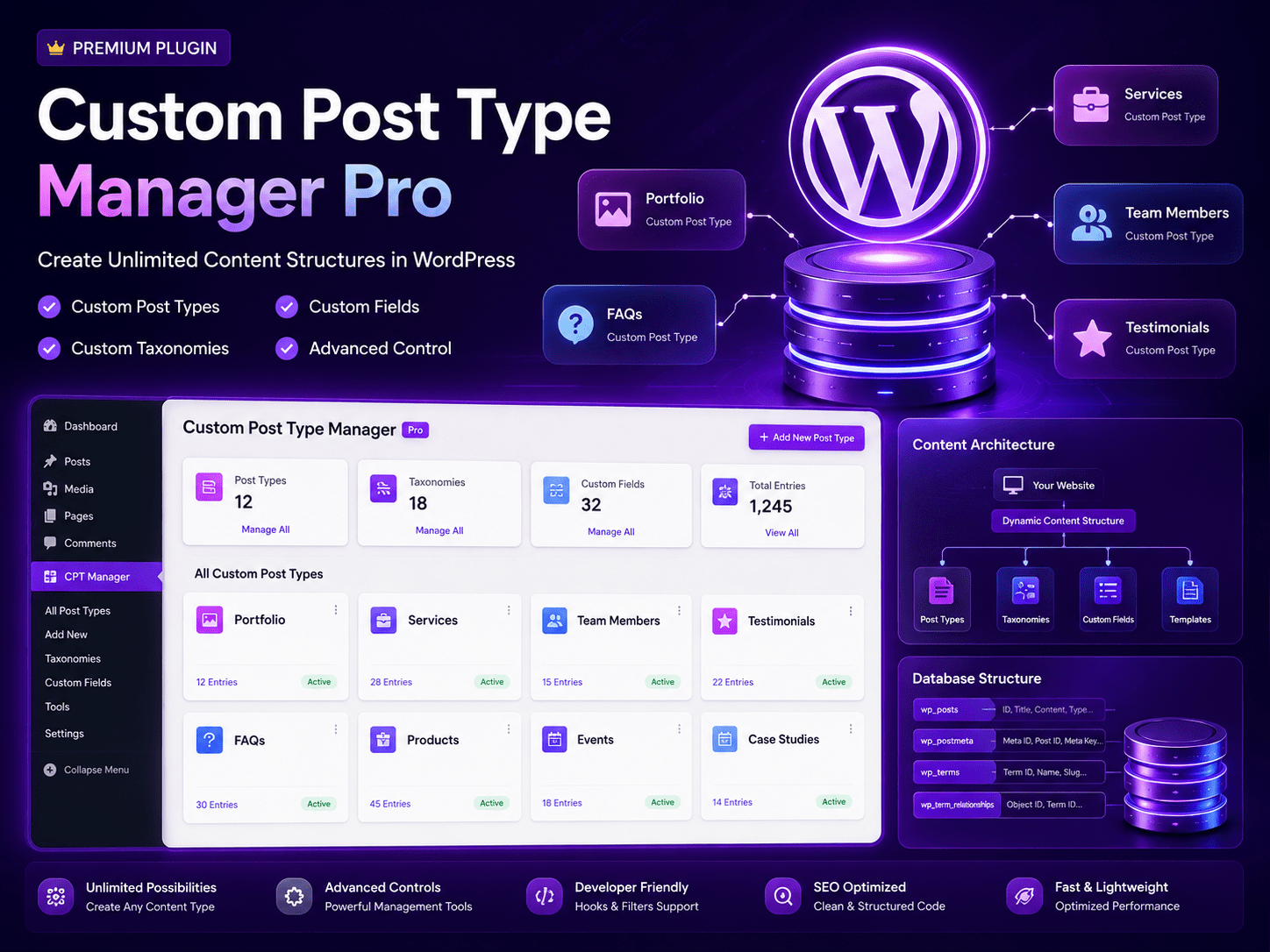
Take Complete Control of Your WordPress Content Architecture with Custom Post Type Manager Pro – The Ultimate Content Structure Plugin
Welcome to Custom Post Type Manager Pro, the most powerful, flexible, and user-friendly content structure plugin for WordPress. Whether you run a business website, a portfolio, an e-commerce store, or a complex content platform, this all-in-one solution empowers you to create unlimited Custom Post Types, Taxonomies, and Custom Fields—without writing a single line of code.
WordPress is a powerful content management system, but its default posts and pages are often not enough for modern websites. Businesses need custom content structures like Portfolios, Services, Testimonials, Team Members, Products, FAQs, and more. Custom Post Type Manager Pro gives you the tools to build the exact content architecture your website needs, with complete control and flexibility.
Why Choose Custom Post Type Manager Pro?
1. Create Unlimited Custom Post Types
Say goodbye to generic posts and pages. With Custom Post Type Manager Pro, you can create as many custom post types as you need:
Portfolio: Showcase your projects and creative work.
Services: Display your services with detailed descriptions.
Team Members: Profile your staff and organization.
Testimonials: Collect and display customer reviews.
Products: Advanced product management beyond standard WooCommerce.
FAQs: Create and organize frequently asked questions.
Any Custom Content Type: The possibilities are endless.
2. Build Custom Taxonomies
Organize your content with precision using custom taxonomies:
Hierarchical Taxonomies: Category-style organization for structured content.
Non-Hierarchical Taxonomies: Tag-style organization for flexible grouping.
Multiple Taxonomies: Assign multiple taxonomies to any post type.
Advanced Filtering: Better content discovery and navigation.
3. Add Custom Fields
Enhance your content with custom fields:
Multiple Field Types: Text, textarea, number, date, checkbox, radio, select, and more.
Field Groups: Organize custom fields into logical groups.
Meta Boxes: Display custom fields in intuitive meta boxes.
Advanced Data: Store and display additional content information.
4. Complete Content Architecture Management
Take full control of your website’s content architecture:
Dashboard Overview: At-a-glance view of all custom post types and entries.
Content Analytics: Monitor post counts and activity.
Database Structure: Visual representation of your content architecture.
Clean Database: Efficient storage and retrieval of content data.
5. Unlimited Possibilities
The power of custom content structures is limitless:
Real Estate: Property listings with custom fields for price, location, bedrooms, etc.
Job Board: Job postings with application forms and custom taxonomies.
Events: Event listings with date, location, and ticketing information.
Education: Courses, lessons, and student management.
Directory: Business listings with contact information and categories.
Anything You Can Imagine: Build the exact content structure your business needs.
6. Advanced Controls & Management Tools
Stay in complete control with powerful management tools:
Bulk Edit: Manage multiple entries at once.
Advanced Filtering: Filter content by type, taxonomy, or custom field.
Sort & Organize: Drag-and-drop sorting for custom ordering.
Quick Edit: Fast updates without leaving the list view.
7. Developer Friendly
We understand that developers need flexibility:
Hooks & Filters: Extend functionality with custom code.
Clean Code: Well-documented, semantic code for easy customization.
API Integration: Programmatic access to all features.
Custom Templates: Support for custom single and archive templates.
8. SEO Optimized
Boost your search rankings with SEO-friendly content:
Semantic HTML: Clean, structured code for search engines.
Custom Permalinks: SEO-friendly URLs for all custom post types.
Meta Tags: Customizable meta descriptions and titles.
Schema Support: Rich snippets for better search results.
9. Fast & Lightweight
Performance matters for user experience and SEO:
Optimized Database Queries: Efficient data retrieval for speed.
Lightweight Code: Minimal overhead for fast loading times.
Caching Compatible: Works with popular caching plugins.
CDN Ready: Optimized for content delivery networks.
10. Easy to Use & No Coding Required
We believe powerful tools should be accessible to everyone. Custom Post Type Manager Pro requires No Coding Skills to operate. The intuitive interface allows you to create and manage content structures with just a few clicks.
The WooCommerce Advantage: Convert Any Website into a Booking System
Do you want to extend WooCommerce with custom content types for booking services? Custom Post Type Manager Pro seamlessly integrates with WooCommerce to help you Convert any WooCommerce to booking system with custom post types. If you are running a WordPress WooCommerce booking system, you can now create custom booking types, appointment categories, and service catalogs with custom fields and taxonomies.
This makes our plugin the perfect solution for a booking WooCommerce site that needs to manage complex booking content structures. Whether you are implementing a Service booking WooCommerce WordPress solution for a hotel with room types, a salon with service categories, or a rental business with equipment types, Custom Post Type Manager Pro bridges the gap between standard content and booking management.
Key Features at a Glance:
Unlimited Custom Post Types: Create any content type you need.
Custom Taxonomies: Hierarchical and non-hierarchical taxonomies.
Custom Fields: Multiple field types and field groups.
Advanced Controls: Bulk edit, filtering, sorting, and quick edit.
Dashboard Overview: At-a-glance content management.
Content Architecture: Visual representation of your content structure.
Database Optimization: Efficient data storage and retrieval.
Developer Friendly: Hooks, filters, and clean code.
SEO Optimized: Semantic HTML and schema support.
Fast & Lightweight: Optimized for performance.
No Coding Required: User-friendly interface for everyone.
Fully Customizable: Templates and styling options.
Translation Ready: WPML compatible for multilingual sites.
WooCommerce Compatible: Perfect for booking WooCommerce site integration.
Dedicated 24/7 Support & Regular Updates.
Who Is This Plugin For?
Business Websites: Create custom content types for services, team, and portfolio.
E-commerce Stores: Extend product data with custom fields and taxonomies.
Real Estate Sites: Property listings with custom fields and categories.
Job Boards: Job postings with application management.
Events Sites: Event listings and management.
Education Platforms: Courses, lessons, and student data.
Agencies: Portfolio, case studies, and team management.
Any WordPress Website needing custom content structures.
How It Works:
Install & Activate: Install the plugin and activate it in minutes.
Create Post Type: Define a new custom post type with a few clicks.
Add Taxonomies: Organize your content with custom categories or tags.
Add Custom Fields: Enhance content with additional data fields.
Publish Content: Start creating and managing your custom content.
Display Anywhere: Use templates or shortcodes to display your content.
Use Cases:
Portfolio: Showcase projects with images, descriptions, and client details.
Services: Display services with pricing, duration, and booking links.
Team: Profile staff with photos, bios, and social links.
Testimonials: Collect and display customer reviews with ratings.
FAQs: Create organized frequently asked questions with answers.
Real Estate: Property listings with all relevant details.
Events: Event schedules, speakers, and registration.
Installation & Support
Installation is quick and straightforward, requiring no technical expertise. The intuitive interface ensures you can start creating custom content structures immediately. Our dedicated support team is available 24/7 to assist you with any questions, customizations, or technical issues.
Don’t Wait—Take Complete Control of Your Content Architecture Today!
Get the best WordPress WooCommerce booking system companion plugin designed to create unlimited custom content structures with ease. Whether you run a business website, an e-commerce store, or a complex content platform, Custom Post Type Manager Pro is the only custom content solution you will ever need.
Join thousands of satisfied WordPress users who have transformed their websites with unlimited custom content structures and complete architectural control.